Qui a une licence Copilot dans mon tenant… et qui s'en sert vraiment ?
Lister les licences Microsoft 365 Copilot, les comptes qui les portent et leur usage réel sur 28 jours, avec un rapport HTML prêt à partager.

14/11/2026 · 8 min de lecture
Avant toute discussion de gouvernance ou de renouvellement, trois questions : combien de licences Copilot sont achetées, qui les porte, et qui s’en sert réellement. Le script ci-dessous répond aux trois et produit un export CSV ainsi qu’un rapport HTML autonome, prêt à être envoyé à la direction ou au sponsor du projet.
Ce dont vous avez besoin
- Les modules Microsoft.Graph.Authentication, Microsoft.Graph.Users et Microsoft.Graph.Identity.DirectoryManagement.
- Les scopes
User.Read.All,Organization.Read.AlletReports.Read.All. - En délégué, un rôle Entra qui autorise la lecture des rapports d’usage : Lecteur de rapports (Reports Reader) suffit, pas besoin d’être administrateur global.
Le script
📥 Script complet à télécharger : Get-CopilotLicenseUsage.ps1 sur GitHub
.\Get-CopilotLicenseUsage.ps1 -OutputFolder C:\Temp
Afficher le script complet, étape par étape (≈ 240 lignes)
Connect-MgGraph -Scopes "User.Read.All","Organization.Read.All","Reports.Read.All" -NoWelcome

# 1. Références de licence Copilot achetées
$skus = @(Get-MgSubscribedSku | Where-Object SkuPartNumber -like "*Copilot*")
$skus | Select-Object SkuPartNumber,
    @{n='Achetées';e={$_.PrepaidUnits.Enabled}},
    @{n='Attribuées';e={$_.ConsumedUnits}},
    @{n='Libres';e={$_.PrepaidUnits.Enabled - $_.ConsumedUnits}} |
    Format-Table -AutoSize
$skuIds = @($skus.SkuId)

# 2. Comptes qui portent au moins une de ces licences
$licencies = @(Get-MgUser -All -Property DisplayName,UserPrincipalName,AccountEnabled,AssignedLicenses,Department |
    Where-Object { @($_.AssignedLicenses.SkuId | Where-Object { $_ -in $skuIds }).Count -gt 0 })

# 3. Rapport d'usage Copilot sur 28 jours (export CSV officiel, utilisateurs licenciés uniquement)
$csv = Join-Path ([IO.Path]::GetTempPath()) "copilot_usage_D28.csv"
Invoke-MgGraphRequest -Method GET -OutputFilePath $csv `
    -Uri "https://graph.microsoft.com/v1.0/copilot/reports/getMicrosoft365CopilotUsageUserDetail(period='D28')"
$usage = @(Import-Csv $csv)
$parUpn = @{}
foreach ($u in $usage) { $parUpn[([string]$u.'User Principal Name').ToLower()] = $u }
Write-Host "$($usage.Count) ligne(s) dans le rapport d'usage, $($licencies.Count) compte(s) licencié(s)."

if ($usage.Count -and $usage[0].'User Principal Name' -match '^[0-9A-F]{32}$') {
    Write-Warning "Les noms sont masqués dans les rapports d'usage : le croisement est impossible (voir plus bas)."
}

# 4. Croisement licence x usage
$nomsApps = @{ 'Microsoft Teams'='Teams'; 'Microsoft 365'='App Microsoft 365 Copilot'; 'Copilot Agent'='Agents' }
$aujourdhui = Get-Date
$rapport = @(foreach ($l in $licencies) {
    $u = $parUpn[$l.UserPrincipalName.ToLower()]
    $derniere = if ($u -and $u.'Last Activity Date') { [datetime]$u.'Last Activity Date' } else { $null }
    $jours    = if ($derniere) { [int]($aujourdhui - $derniere).TotalDays } else { $null }

    # Applications utilisées sur la période (colonnes « … Last Activity Date » renseignées)
    $apps = if ($u) {
        ($u.PSObject.Properties |
            Where-Object { $_.Name -like '* Last Activity Date' -and $_.Name -ne 'Last Activity Date' -and $_.Value } |
            ForEach-Object {
                $cle = $_.Name -replace ' Last Activity Date$','' -replace ' Copilot$',''
                if ($nomsApps[$cle]) { $nomsApps[$cle] } else { $cle }
            } | Sort-Object -Unique) -join ', '
    }

    [pscustomobject]@{
        Nom              = $l.DisplayName
        UPN              = $l.UserPrincipalName
        Service          = $l.Department
        CompteActif      = $l.AccountEnabled
        DerniereActivite = if ($derniere) { $derniere.ToString('yyyy-MM-dd') } else { '' }
        Statut           = if (-not $l.AccountEnabled) { 'Compte désactivé' }
                           elseif ($null -eq $jours)   { 'Aucun usage sur 28 j' }
                           elseif ($jours -le 7)       { 'Actif (7 j)' }
                           else                        { 'Occasionnel (8-28 j)' }
        Applications     = $apps
    }
})

# 5. Synthèse console + export CSV
$rapport | Group-Object Statut | Sort-Object Count -Descending |
    Select-Object @{n='Statut';e={$_.Name}}, Count | Format-Table -AutoSize
$base = ".\Copilot_Licences_Usage_{0:yyyyMMdd}" -f $aujourdhui
$rapport | Sort-Object Statut, Nom | Export-Csv "$base.csv" -NoTypeInformation -Encoding utf8 -Delimiter ';'

# 6. Rapport HTML (couleurs PulsivIT, logo UnderTenant)
$inv = [Globalization.CultureInfo]::InvariantCulture
function Enc($s) { [System.Net.WebUtility]::HtmlEncode([string]$s) }
function Pct($n, $sur) { if ($sur) { ([math]::Round(100 * $n / $sur, 1)).ToString($inv) } else { '0' } }

$statuts = [ordered]@{ 'Actif (7 j)'='ok'; 'Occasionnel (8-28 j)'='mid'; 'Aucun usage sur 28 j'='off'; 'Compte désactivé'='dis' }
$nb = @{}; foreach ($s in $statuts.Keys) { $nb[$s] = @($rapport | Where-Object Statut -eq $s).Count }
$achetees   = ($skus | ForEach-Object { $_.PrepaidUnits.Enabled } | Measure-Object -Sum).Sum
$attribuees = ($skus | ForEach-Object { $_.ConsumedUnits } | Measure-Object -Sum).Sum
$ouverts    = @($rapport | Where-Object CompteActif).Count
$adoption   = if ($ouverts) { [math]::Round(100 * ($nb['Actif (7 j)'] + $nb['Occasionnel (8-28 j)']) / $ouverts) } else { 0 }

try {
    $png  = (Invoke-WebRequest "https://undertenant.fr/images/undertenant-logo.png" -UseBasicParsing -TimeoutSec 10).RawContentStream.ToArray()
    $logo = '<img src="data:image/png;base64,' + [Convert]::ToBase64String($png) + '" alt="UnderTenant">'
} catch { $logo = '<span class="logo-txt">UnderTenant</span>' }

$kpis = @(
    "<div class=""kpi""><b>$achetees</b><span>Licences achetées</span></div>"
    "<div class=""kpi""><b>$attribuees</b><span>Attribuées</span></div>"
    "<div class=""kpi""><b>$($achetees - $attribuees)</b><span>Libres</span></div>"
    "<div class=""kpi ok""><b>$($nb['Actif (7 j)'])</b><span>Actifs sur 7 jours</span></div>"
    "<div class=""kpi accent""><b>$adoption %</b><span>Taux d'adoption (28 j)</span></div>"
) -join "`n"

$barre   = ($statuts.Keys | Where-Object { $nb[$_] } | ForEach-Object {
    "<span class=""seg $($statuts[$_])"" style=""width:$(Pct $nb[$_] $rapport.Count)%"" title=""$(Enc $_) : $($nb[$_])""></span>" }) -join ''
$legende = ($statuts.Keys | ForEach-Object {
    "<li><i class=""dot $($statuts[$_])""></i>$(Enc $_) <b>$($nb[$_])</b></li>" }) -join "`n"

$parApp = @{}
foreach ($r in $rapport) { foreach ($a in ($r.Applications -split ', ' | Where-Object { $_ })) { $parApp[$a] = 1 + [int]$parApp[$a] } }
$apps = ($parApp.GetEnumerator() | Sort-Object Value -Descending | ForEach-Object {
    "<div class=""bar-row""><span>$(Enc $_.Key)</span><div class=""bar""><i style=""width:$(Pct $_.Value $rapport.Count)%""></i></div><b>$($_.Value)</b></div>" }) -join "`n"
if (-not $apps) { $apps = '<p class="muted">Aucune activité sur la période.</p>' }

$lignesSku = ($skus | ForEach-Object {
    "<tr><td>$(Enc $_.SkuPartNumber)</td><td>$($_.PrepaidUnits.Enabled)</td><td>$($_.ConsumedUnits)</td><td>$($_.PrepaidUnits.Enabled - $_.ConsumedUnits)</td></tr>" }) -join "`n"
$lignesUsers = ($rapport | Sort-Object Statut, Nom | ForEach-Object {
    "<tr data-s=""$($statuts[$_.Statut])""><td>$(Enc $_.Nom)</td><td>$(Enc $_.UPN)</td><td>$(Enc $_.Service)</td><td><span class=""badge $($statuts[$_.Statut])"">$(Enc $_.Statut)</span></td><td>$($_.DerniereActivite)</td><td>$(Enc $_.Applications)</td></tr>" }) -join "`n"

$modele = @'
<!DOCTYPE html>
<html lang="fr" dir="ltr">
<head>
<meta charset="utf-8">
<meta name="viewport" content="width=device-width, initial-scale=1">
<meta name="color-scheme" content="light dark">
<title>Adoption Microsoft 365 Copilot · %%TENANT%%</title>
<style>
:root{--navy:#253471;--ciel:#009DDA;--gris:#678597;--fond:#f4f6fa;--blanc:#fff;--texte:#1c2440;--ligne:#dde3ee;
--ok:#1f9d55;--mid:#009DDA;--off:#e0a100;--dis:#9aa5b1;--titre:#253471;--zebra:#f8f9fc}
@media (prefers-color-scheme:dark){:root{--fond:#0f1729;--blanc:#16213b;--texte:#e7ecf5;--ligne:#2a3a5c;--titre:#7cc8f0;--zebra:#1a2645}}
*{box-sizing:border-box}
body{margin:0;background:var(--fond);color:var(--texte);font:15px/1.55 Montserrat,"Segoe UI",system-ui,sans-serif}
header{background:var(--navy);color:var(--blanc);padding:22px 32px;display:flex;align-items:center;gap:24px;flex-wrap:wrap;border-block-end:4px solid var(--ciel)}
header img{height:52px;width:auto}
.logo-txt{font-weight:800;font-size:1.5rem}
header h1{margin:0;font-size:1.35rem;font-weight:800}
header p{margin:2px 0 0;opacity:.85;font-size:.9rem}
main{max-width:1180px;margin:0 auto;padding:26px 24px 10px}
.kpis{display:grid;grid-template-columns:repeat(auto-fit,minmax(170px,1fr));gap:14px;margin-block-end:22px}
.kpi{background:var(--blanc);border:1px solid var(--ligne);border-radius:12px;padding:16px 18px;border-block-start:4px solid var(--navy)}
.kpi b{display:block;font-size:1.9rem;font-weight:800;color:var(--titre);line-height:1.2}
.kpi span{color:var(--gris);font-size:.85rem}
.kpi.ok{border-block-start-color:var(--ok)}.kpi.ok b{color:var(--ok)}
.kpi.accent{border-block-start-color:var(--ciel)}.kpi.accent b{color:var(--ciel)}
.grid2{display:grid;grid-template-columns:1fr 1fr;gap:18px;margin-block-end:22px}
section{background:var(--blanc);border:1px solid var(--ligne);border-radius:12px;padding:18px 20px}
h2{margin:0 0 14px;font-size:1.05rem;color:var(--titre);font-weight:800}
.stack{display:flex;height:22px;border-radius:11px;overflow:hidden;background:var(--ligne)}
.seg.ok,.dot.ok,.badge.ok{background:var(--ok)}.seg.mid,.dot.mid,.badge.mid{background:var(--mid)}
.seg.off,.dot.off,.badge.off{background:var(--off)}.seg.dis,.dot.dis,.badge.dis{background:var(--dis)}
.legend{list-style:none;padding:0;margin:14px 0 0;display:grid;grid-template-columns:1fr 1fr;gap:6px 14px;font-size:.9rem}
.dot{display:inline-block;width:11px;height:11px;border-radius:50%;margin-inline-end:8px}
.legend b{float:inline-end}
.bar-row{display:grid;grid-template-columns:150px 1fr 40px;align-items:center;gap:10px;margin:7px 0;font-size:.9rem}
.bar{height:12px;background:var(--fond);border-radius:6px;overflow:hidden}
.bar i{display:block;height:100%;background:linear-gradient(90deg,var(--navy),var(--ciel))}
.bar-row b{text-align:end;color:var(--titre)}
table{width:100%;border-collapse:collapse;font-size:.88rem}
th{background:var(--navy);color:var(--blanc);text-align:start;padding:9px 10px;font-weight:600}
td{padding:8px 10px;border-block-end:1px solid var(--ligne)}
tbody tr:nth-child(even){background:var(--zebra)}
.badge{color:var(--blanc);border-radius:20px;padding:2px 10px;font-size:.78rem;white-space:nowrap}
.tools{display:flex;gap:8px;flex-wrap:wrap;align-items:center;margin-block-end:12px}
.tools input{flex:1;min-width:220px;padding:8px 12px;border:1px solid var(--ligne);border-radius:8px;font:inherit;background:var(--blanc);color:var(--texte)}
.tools button{border:1px solid var(--titre);background:var(--blanc);color:var(--titre);border-radius:8px;padding:7px 12px;font:inherit;font-size:.85rem;cursor:pointer}
.tools button.on{background:var(--navy);color:var(--blanc)}
.muted{color:var(--gris)}
.full{margin-block-end:22px}
footer{text-align:center;color:var(--gris);font-size:.8rem;padding:10px 20px 26px}
footer a{color:var(--ciel)}
@media (max-width:820px){.grid2{grid-template-columns:1fr}.legend{grid-template-columns:1fr}}
@media print{:root{--fond:#fff;--blanc:#fff;--texte:#1c2440;--ligne:#dde3ee;--titre:#253471;--zebra:#f8f9fc}.tools{display:none}section,.kpi{break-inside:avoid}}
</style>
</head>
<body>
<header>
  %%LOGO%%
  <div>
    <h1>Adoption Microsoft 365 Copilot</h1>
    <p>%%TENANT%% · généré le %%DATE%% · données d'usage au %%REFRESH%% (28 derniers jours)</p>
  </div>
</header>
<main>
  <div class="kpis">
%%KPIS%%
  </div>
  <div class="grid2">
    <section>
      <h2>Répartition des utilisateurs licenciés</h2>
      <div class="stack">%%BARRE%%</div>
      <ul class="legend">
%%LEGENDE%%
      </ul>
    </section>
    <section>
      <h2>Usage par application</h2>
%%APPS%%
    </section>
  </div>
  <section class="full">
    <h2>Licences</h2>
    <table><thead><tr><th>Référence</th><th>Achetées</th><th>Attribuées</th><th>Libres</th></tr></thead>
    <tbody>
%%SKUS%%
    </tbody></table>
  </section>
  <section class="full">
    <h2>Utilisateurs licenciés (%%NB%%)</h2>
    <div class="tools">
      <input id="q" type="search" placeholder="Rechercher un nom, un service…" aria-label="Rechercher">
      <button type="button" class="on" data-f="">Tous</button>
      <button type="button" data-f="ok">Actifs</button>
      <button type="button" data-f="mid">Occasionnels</button>
      <button type="button" data-f="off">Sans usage</button>
      <button type="button" data-f="dis">Désactivés</button>
    </div>
    <table id="users"><thead><tr><th>Nom</th><th>UPN</th><th>Service</th><th>Statut</th><th>Dernière activité</th><th>Applications</th></tr></thead>
    <tbody>
%%USERS%%
    </tbody></table>
  </section>
</main>
<footer>Rapport généré avec le script du tip « Qui a une licence Copilot dans mon tenant ? » · <a href="https://undertenant.fr">undertenant.fr</a></footer>
<script>
(function(){
  var q=document.getElementById('q'),f='',rows=document.querySelectorAll('#users tbody tr'),btns=document.querySelectorAll('.tools button');
  function apply(){var t=q.value.toLowerCase();rows.forEach(function(r){r.hidden=!((!f||r.dataset.s===f)&&r.textContent.toLowerCase().indexOf(t)>-1);});}
  q.addEventListener('input',apply);
  btns.forEach(function(b){b.addEventListener('click',function(){btns.forEach(function(x){x.classList.remove('on');});b.classList.add('on');f=b.dataset.f;apply();});});
})();
</script>
</body>
</html>
'@

$valeurs = [ordered]@{
    '%%LOGO%%'    = $logo
    '%%TENANT%%'  = Enc (Get-MgOrganization).DisplayName
    '%%DATE%%'    = $aujourdhui.ToString('dd/MM/yyyy HH:mm')
    '%%REFRESH%%' = Enc ($usage | Select-Object -First 1).'Report Refresh Date'
    '%%KPIS%%'    = $kpis;    '%%BARRE%%' = $barre;     '%%LEGENDE%%' = $legende
    '%%APPS%%'    = $apps;    '%%SKUS%%'  = $lignesSku; '%%USERS%%'   = $lignesUsers
    '%%NB%%'      = $rapport.Count
}
$html = $modele
foreach ($k in $valeurs.Keys) { $html = $html.Replace($k, [string]$valeurs[$k]) }
$html | Set-Content "$base.html" -Encoding utf8
Write-Host "Rapports : $base.csv et $base.html"
Invoke-Item "$base.html"
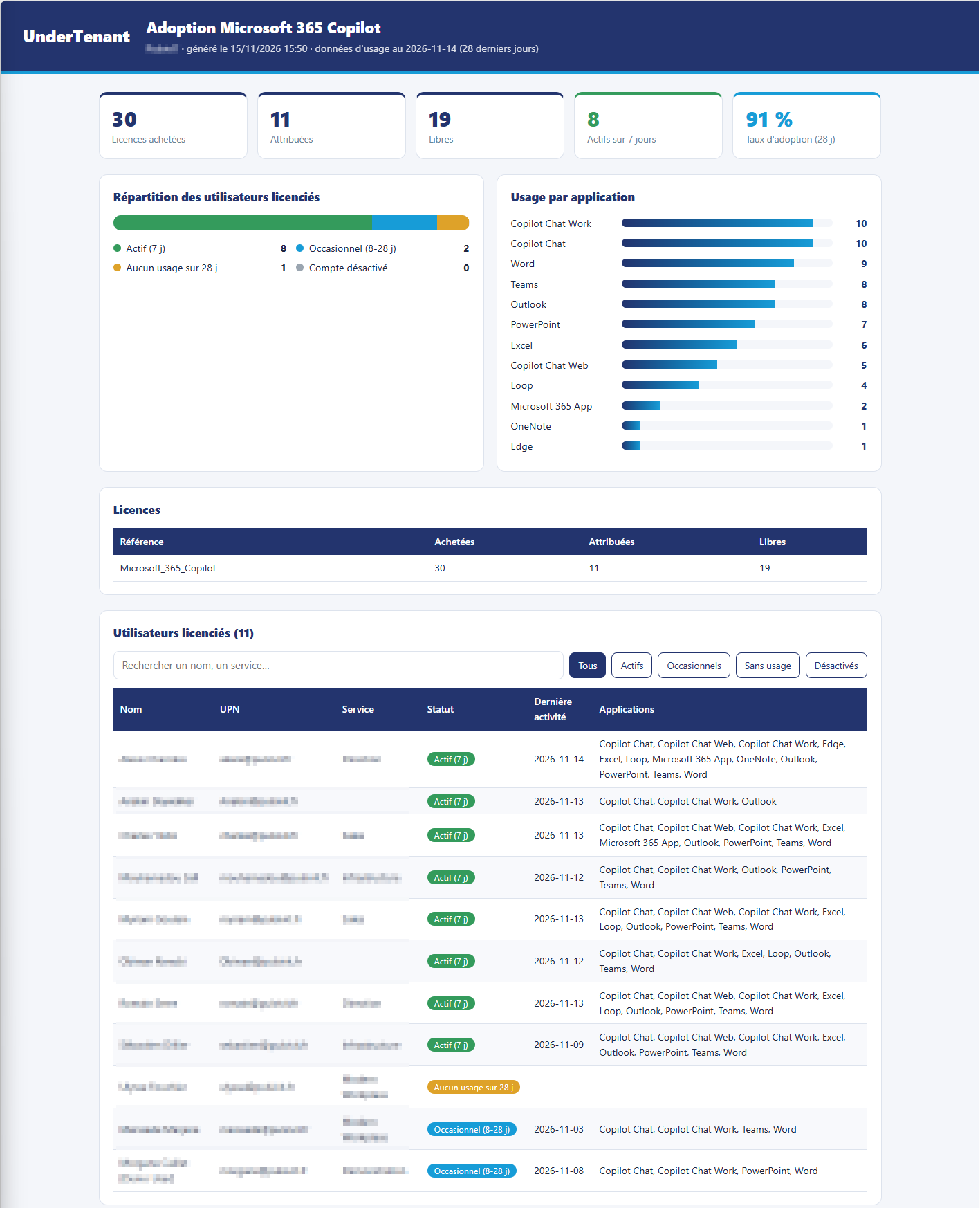
Le rapport HTML est autonome : styles et logo sont intégrés au fichier. Il s’ouvre dans n’importe quel navigateur, s’envoie par mail et s’imprime proprement en PDF (Ctrl+P). Recherche et filtres par statut sont disponibles dans le tableau des utilisateurs.
Lire le résultat
| Statut | Ce que ça veut dire | Piste d’action |
|---|---|---|
| Actif (7 j) | Copilot fait partie du quotidien | Identifier des relais, recueillir des cas d’usage |
| Occasionnel (8-28 j) | Usage ponctuel | Accompagnement ciblé sur les applications non utilisées |
| Aucun usage sur 28 j | Licence attribuée mais pas utilisée | Échanger avec la personne avant de réattribuer |
| Compte désactivé | Licence bloquée sur un compte fermé | À récupérer en priorité |
Le taux d’adoption affiché correspond aux utilisateurs actifs ou occasionnels sur 28 jours, rapportés aux comptes licenciés encore ouverts. Le bloc Usage par application montre où Copilot est utilisé (Teams, Word, Outlook, Copilot Chat…) : très parlant pour orienter la formation.
Par défaut, Microsoft 365 masque les noms dans les rapports d’usage. Si le script signale « aucune correspondance », c’est ce paramètre : centre d’administration Microsoft 365 > Paramètres > Paramètres de l’organisation > Services > Rapports, décochez le masquage des noms. Décision à prendre avec le DPO : ces rapports deviennent nominatifs.
- Les données du rapport ont 24 à 48 h de décalage.
- Le rapport ne couvre que les utilisateurs licenciés Microsoft 365 Copilot : l’usage gratuit de Copilot Chat n’y figure pas (rapport dédié dans le centre d’administration ou journal d’audit Purview).
- Le filtre
*Copilot*peut ramener d’autres références selon votre contrat : vérifiez la liste affichée à l’étape 1. - Sous Windows PowerShell 5.1, enregistrez le script en UTF-8 avec BOM pour que les accents s’affichent correctement dans le rapport.
Un dernier conseil : présentez ce rapport comme un indicateur d’adoption, pas comme un outil de contrôle individuel. Le but est de savoir où accompagner, pas de pointer du doigt.
Pour aller plus loin : documentation du rapport d’usage Copilot (Microsoft Graph)
Exemple de résultat